Stop scrolling. Start focusing.
BeFocus is a distraction blocker for Android phones and Windows computers. It blocks Reels, Shorts, distracting apps and adult websites, and it makes switching protection off slow enough for the urge to pass.
Free for 3 days, no card needed. Android 7.0 or later. Windows 10 or later. Sign in with Google.
Most blockers are one tap away from off
You set a limit in the morning and dismiss it at night. BeFocus is built for the moment when your willpower is lowest.
Endless short videos
You open an app to reply to a message and lose an hour to Reels. BeFocus blocks YouTube Shorts, or Instagram, Facebook and Snapchat completely, in the app and the browser.
Limits you can ignore
Once protection is locked, removing it takes a 48-hour wait. If you have a partner, only their code unlocks it.
Late-night habits
Schedules can run overnight, so your chosen apps stay closed while you should be asleep.
Adult content
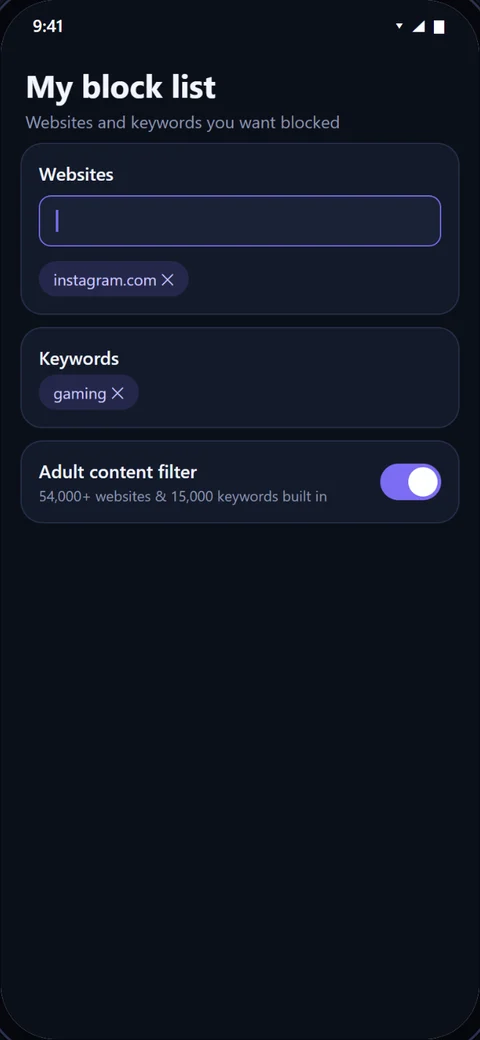
A built-in filter covers about 54,000 websites and 15,000 keywords, plus any you add.
Distraction at work and study
Block apps and sites during focus hours on both your phone and your PC.
Children and screens
A parent can be the accountability partner, so only the parent holds the code.
Choose your shields
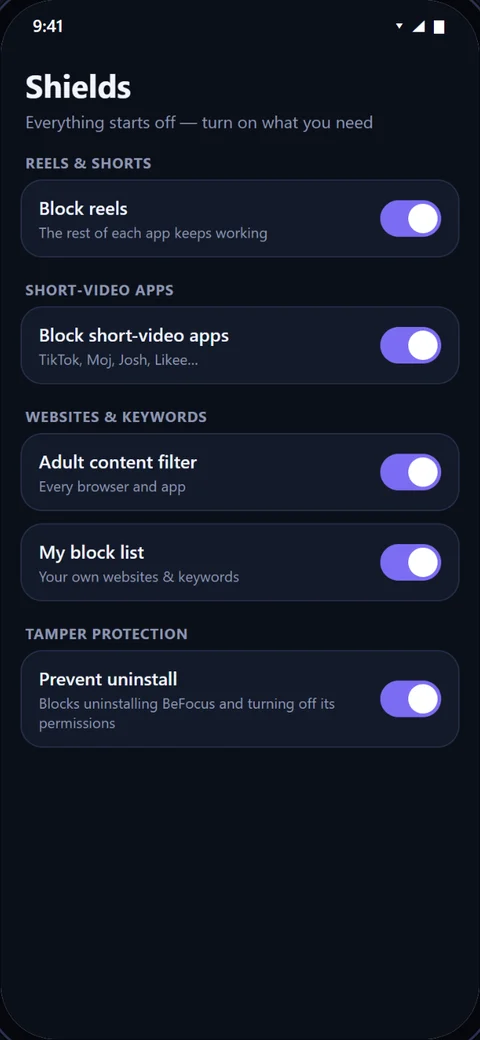
Everything starts off. You decide what to block and when.
Reels and Shorts
Blocks short-video feeds in Instagram, YouTube, Facebook and Snapchat.
Short-video apps and sites
Blocks TikTok, Moj, Josh, Likee and similar services entirely.
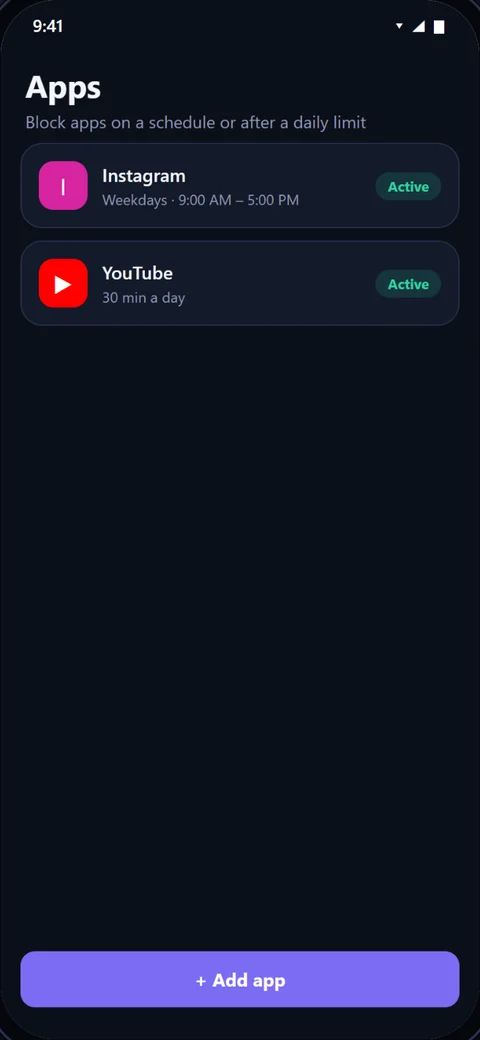
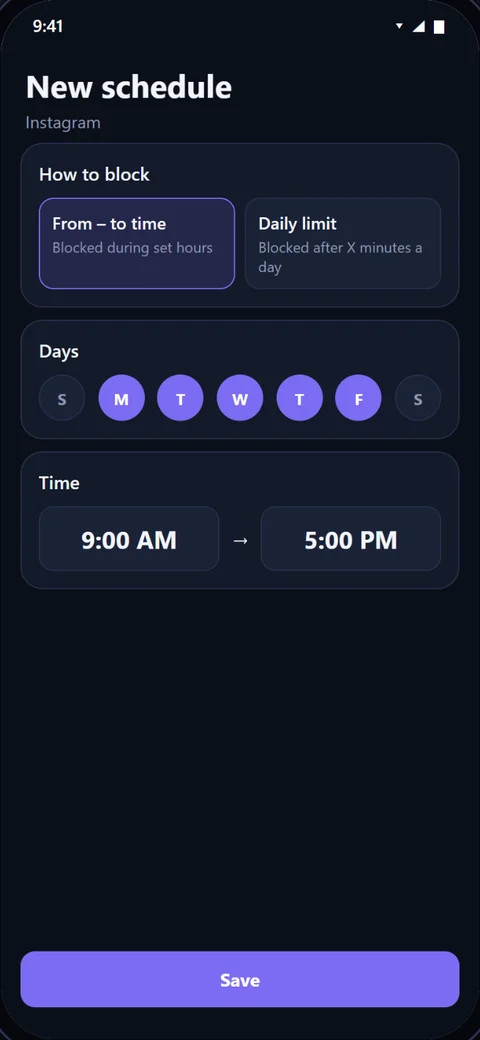
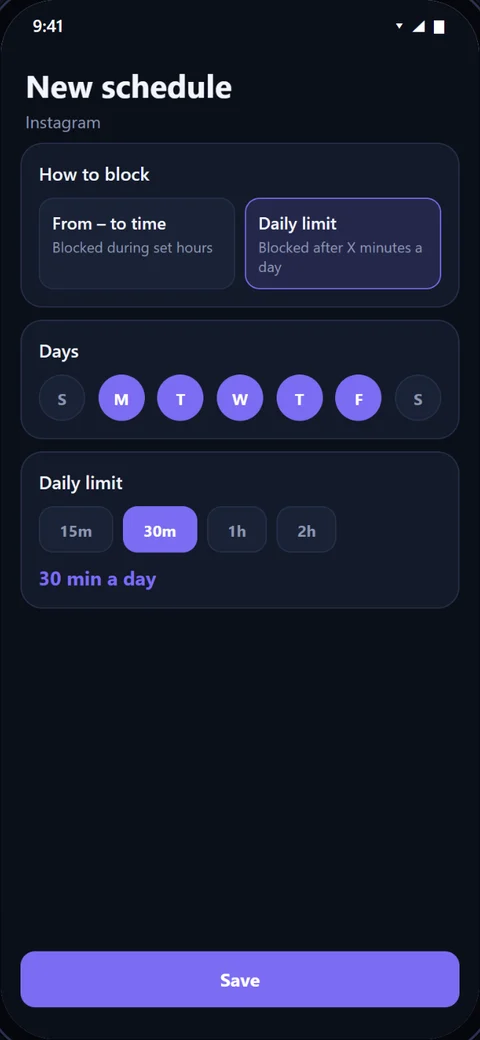
Schedules and daily limits
Block by days and hours, or after a set number of minutes each day.
Adult filter and block list
Works in major browsers. On Android it also checks searches you type in apps.
100-second pause
The block screen explains which rule applied and gives you time to reset.
Accountability partner
A friend or parent holds the code in their authenticator app.
Uninstall protection
Helps stop BeFocus from being removed in a weak moment.
Strict lock hours
Choose times when even your partner’s code will not unlock.
System app guard
Your partner’s code can guard the app store and settings too.
BeFocus on Android
Set it up in a few minutes. Each permission is requested only when a feature needs it.
BeFocus on your desktop
Closing the phone does not help if the same feed is open on your PC. The Windows app applies the same idea to programs and browsers.
- Blocks apps and websites on a schedule or daily limit
- Reads the browser’s address bar to block short-video feeds and sites
- Supports Chrome, Edge, Firefox, Brave, Opera, Vivaldi and more
- Covers every monitor during a block
- Runs with a Windows service, so closing the window does not stop it
 BeFocus
How it works
Sign in
Use your Google account. Your 3-day free trial starts right away, no payment needed.
Choose what to block
Add apps and sites, set hours or limits, and turn on shields.
Lock it in
Add a partner, or rely on the 48-hour wait. Then get on with your day.
3 days free, then a yearly plan
Your 3-day free trial starts with your first sign-in and covers Android and Desktop. No payment details needed. Each plan is a single payment for one year and does not renew by itself.
Android
₹365 / year
One year of BeFocus on Android.
Try free for 3 days first.
Desktop
₹400 / year
One year of BeFocus on Windows.
Try free for 3 days first.
Android + Desktop
₹700 / year
One year of BeFocus on both.
Try free for 3 days first.
The final price depends on the country detected when you pay and is shown before payment. Payments are processed by Razorpay. See our refund policy and terms.
Your screen stays on your device
Blocking decisions are made locally. The pages you visit, the apps you use and the text you type are not sent to our servers.
- We use your Google name, email and profile picture link for your account
- Payments are handled by Razorpay; we do not store card or bank details
- We do not show ads or use analytics trackers in the apps
- This website sets no cookies
Questions
Is there a free trial?
Yes. Every account gets 3 days free, on Android and Desktop, starting with your first sign-in. No payment details are needed. Buy a plan any time during the trial and your year starts after the free days end, so you never lose them.
Does BeFocus block the whole Instagram or YouTube app?
YouTube: no. The Reels shield blocks only YouTube Shorts, in the app and on the website, and the rest of YouTube keeps working. Instagram, Facebook and Snapchat: yes. When you switch them on, the whole app and website are blocked, always, at set hours or after a daily limit.
What if I need to turn it off?
Once protection is locked, removing it takes a 48-hour wait. If you added an accountability partner, their code replaces the wait. Adding more protection never needs an unlock.
What if my partner can no longer give me a code?
Get an emergency unlock: enter the Request ID shown in BeFocus under Lock & unlock, pay, then copy the recovery code and paste it in the app. No sign-in needed. Or email ak9346052261@gmail.com with your Request ID for help.
Can I still make phone calls?
Yes. On Android, phone calls and the emergency dialer are always allowed.
Can BeFocus be bypassed?
It is built to make impulsive bypassing hard, not to be unbreakable. On Windows, for example, an administrator can always stop it.
Is there an iPhone version?
Not yet. BeFocus is for Android phones and Windows PCs.
Does BeFocus need the internet?
You need it to sign in and keep your account up to date. Blocking itself runs on your device.